打造你的音乐万年历(下)
数码时尚
三、用ASP技术实现在线添加歌曲
打开Dreamweaver MX 2004新建一个动态页面,并插入一个表格,以及文本框与按钮(图1)。
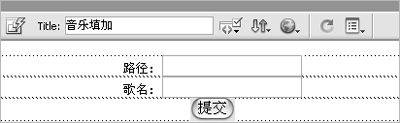
将表单的参数传递属性写为:
method=post action="addmusic.asp"
接着将路径后的文本框的名称定义为“path”,歌名后的文本框名称定义为“songtitle”,然后在代码最上方加入ASP语句:
<%
dim path,songtitle
dim submit
submit=request.form("Submit")
if submit="提交" then
path=request.form("path")
songtitle=request.form("songtitle")
set objxml=server.createobject("microsoft.xmldom")
objxml.async=false
objxml.load server.mappath("music.xml")
if objxml.parseError.ErrorCode<>0 Then
objxml.loadXML"<AudioProps/>"
end if
set themusicNode= objxml.documentElement.AppendChild(objxml.createElement("AudioProps"))
themusicNode.setAttribute "path",path
themusicNode.setAttribute "songTitle",songtitle
objxml.save(server.mappath("music.xml"))
response.write"添加成功!"
response.write"<meta http-equiv='refresh' content='1; url=addmusic.asp'>"
end if
%>
再将这个文件保存为addmusic.asp就OK了。
在这里,代码首先获取表单提交的信息(音乐路径和歌名)然后加载XML页面创建AudioProps结点,设置该结点属性path以及songtitle并同时为其赋值,最后将XML页面保存,添加页面如图2。
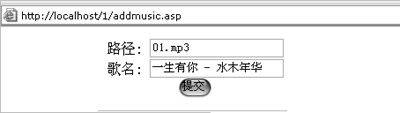
由于采用了XML配合ASP进行外部音乐调用,所以只要你把音乐文件传到空间上,运行addmusic.asp并填入音乐的路径以及歌曲名字就行了,不用再进行代码的修改。到此为止,一款完全应用Flash组件、ASP、XML制作的超酷音乐万年历就出炉了,效果很不错,把它加入到你的网页中是不是很酷?