闹钟送给发烧友
软件世界
很多电脑发烧友玩起电脑来往往废寝忘食、夜以继日。这样既搞坏身体,又影响第二天的工作。那么,能不能做一个闹钟程序,在玩电脑前把时间定好,时间一到,就提醒玩家及时休息呢?当然可以,下面的程序用VB编写,供读者参考。
一、闹钟的工作原理
通过单击“开始”按钮,将输入到文本框的时间值和系统当前的时间作比较,当两者相等时,调用VB内部的API函数,连续播放1分钟提示音。
二、为闹钟设计界面
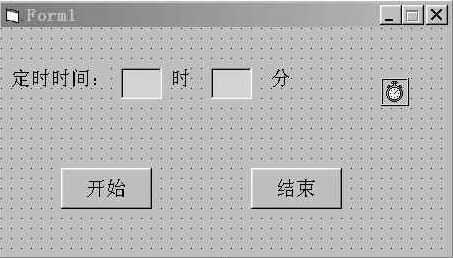
首先运行VB,新建一个EXE工程,在Form上添加三个Label控件,命名为“定时时间:”、“时”和“分”;然后在三个Label控件之间添加两个TextBox控件,一个用来输入小时,另一个用来输入分钟;再添加两个Command控件,命名为“开始”和“结束”;最后添加一个Timer控件,它的Interval属性设置为3000(播放提示音的时间间隔为3秒)。整个界面如图所示。
三、编写代码
'在窗体装入前声明API函数
Private Declare Function PlaySound Lib "winmm.dll" Alias "PlaySoundA" _
(ByVal lpszName As String, ByVal hModule As Long, ByVal dwflags As Long) As Long
Private Sub Form_Load()
Timer1.Enabled = False '停止运行定时器
End Sub
'单击“开始”按钮,输入定时时间,并启动定时器
Private Sub Command1_Click()
Command1.Enabled = False
If Val(Text1) < 1 Or Val(Text1) > 24 Then
MsgBox " 小时数输入错误! ", vbExclamation, "提示信息"
Text1 = ""
Text1.SetFocus
Command1.Enabled = True
End If
If Val(Text2) < 1 Or Val(Text2) > 60 Then
MsgBox " 分钟输入错误! ", vbExclamation, "提示信息"
Text2 = ""
Text2.SetFocus
Command1.Enabled = True
End If
Timer1.Enabled = True
End Sub
'单击“结束”按钮,退出程序
Private Sub Command2_Click()
End
End Sub
'当系统时间到达定时时间时,定时播放提示音
Private Sub Timer1_Timer()
If Text1 = Hour(Time) Then
If Text2 = Minute(Time) Then
Call PlaySound(App.Path + "\Blip.wav", 0&, &H0)
End If
End If
End Sub
注意:Blip.wav是Windows自带的声音文件,也可采用事先录制好的提示音。但该文件一定要与VB程序在同一目录下。
注:本程序在Windows 98、VB6.0下调试通过。