API应用秘技(14):玩转你的鼠标
软件世界
本期看点:用一系列API函数来实现各类鼠标的相关应用,包括鼠标捕获、控制鼠标位置和控制鼠标显示。这些应用不仅能使某些程序功能大为增强,而且对底层的操作也减少了占用的系统资源。
本期实例效果
本期包含3个非常实用的实例,具体效果如下所述:
1.鼠标捕获程序
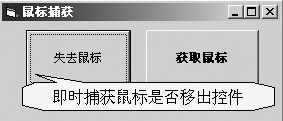
弥补了VB中控件一赶未提供的鼠标移出(即MouseLeave)事件,运行后控件完全可即时捕获鼠标是否移出(如图1所示)。
2.控制鼠标位置程序
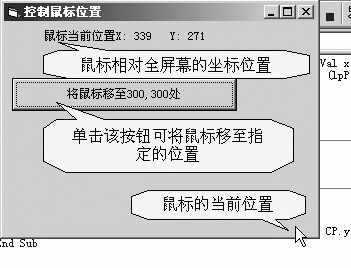
运行后可在全屏幕坐标中即时获取鼠标的位置,并可指定鼠标移至某个指定的位置(如图2所示)。
3.控制鼠标显示程序
运行后可控制鼠标指针为隐藏或显示效果。
鼠标捕获
第一步:启动VB6,新建工程,在窗体上放置一个命令按钮(命名为“Command1”)并通过复制、粘贴的方法创建一个包含两个按钮的控件数组。
输入函数、常数和结构声明(注:列出API函数声明①②③的VB声明代码),程序代码如下所示:
Private Declare Function SetCapture Lib "user32.dll" (ByVal hwnd As Long) As Long'参考API函数声明①
Private Declare Function GetCapture Lib "user32.dll" () As Long'参考API函数声明②
Private Declare Function ReleaseCapture Lib "user32.dll" () As Long'参考API函数声明③
第二步:输入各控件事件代码,如下所示:
Private Sub Form_Load()
ScaleMode = vbTwips
End Sub
'按钮数组鼠标移动事件
Private Sub Command1_MouseMove(Index As Integer, Button As Integer,Shift As Integer,X As Single,Y As Single)
With Command1(Index)
'判断鼠标当前的位置
If X >= 0 And Y >= 0 And X <= .Width And Y <= .Height Then
SetCapture .hwnd
.FontBold = True
.Caption = "获取鼠标"
Else
ReleaseCapture
.FontBold = False
.Caption = "失去鼠标"
End If
End With
End Sub
控制鼠标位置
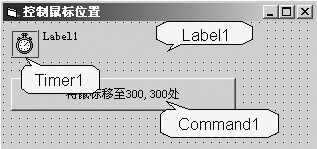
第一步:启动VB6,新建工程,在窗体上放置一个按钮(命名为“Command1”)、一个标签(命名为“Label1”)和一个定时器(命名为“Timer1”)(如图3所示)。
输入函数、常数和结构声明(注:列出API函数声明④⑤的VB声明代码),程序代码如下所示:
Private Declare Function SetCursorPos Lib "user32" (ByVal x As Long,ByVal y As Long) As Long'参考API函数声明④
Private Declare Function GetCursorPos Lib "user32.dll" (lpPoint As POINTAPI) As Long
Private Type POINTAPI'参考API函数声明⑤
x As Long
y As Long
End Type
Dim CP As POINTAPI
第二步:输入如下所示各控件事件代码:
'按钮单击事件
Private Sub Command1_Click()
'设置鼠标位置
SetCursorPos 400,400
End Sub
'定时器事件
Private Sub Timer1_Timer()
'获取鼠标位置
GetCursorPos CP
'显示鼠标位置
Label1.Caption = "鼠标当前位置X:" & CP.x & " Y:" & CP.y
End Sub
控制鼠标显示
第一步:由于本功能可直接作为程序的功能模块调用,因此给出核心子程序代码,用户可直接调用。输入函数声明(注:列出API函数声明⑥的VB声明代码),程序代码如下所示:
Private Declare Function ShowCursor Lib "user32" Alias "ShowCursor" (ByVal bShow As Long) As Long'参考API函数声明⑥
第二步:输入如下所示子程序代码:
'隐藏鼠标子程序
Sub HideMouse()
ShowCursor False
End Sub
'显示鼠标子程序
Sub ShowMouse ()
ShowCursor True
End Sub
注:本期所有实例在Windows2000和VB6环境中调试通过。
相关API函数声明
实现各类鼠标程序所需的API系列函数名称和功能如下所述:
①SetCapture
说明:该函数用于将鼠标捕获设置至指定窗体。在鼠标按钮按下时,该窗体会为当前应用程序或系统接收所有的鼠标输入。
返回值:Long型,代表拥有捕获的窗体句柄。
参数:
hwnd:Long型,代表需要接收所有鼠标输入的窗体句柄。
VB声明:Declare Function SetCapture Lib "user32" Alias "SetCapture" (ByVal hwnd As Long) As Long
②GetCapture
说明:该函数用于获取窗体的句柄,该窗体位于当前输入线程,且拥有鼠标捕获(即接收鼠标活动),如当前线程中存在拥有捕获的窗体,则返回拥有捕获的窗体句柄。
返回值:Long型,代表拥有捕获的窗体句柄。
VB声明:Declare Function GetCapture Lib "user32" Alias "GetCapture" () As Long
③ReleaseCapture
说明:该函数用于为当前应用程序释放鼠标捕获。
返回值:Long型,如返回非零值,则代表成功。
VB声明:Declare Function ReleaseCapture Lib "user32" Alias "ReleaseCapture" () As Long
④SetCursorPos
说明:该函数用于设置鼠标指针的位置。
返回值:Long型,如返回非零值,则代表成功。
参数:
x,y:代表鼠标指针在屏幕像素坐标系统中的X轴和Y轴坐标。
VB声明:Declare Function SetCursorPos Lib "user32" Alias "SetCursorPos" (ByVal x As Long, ByVal y As Long) As Long
⑤GetCursorPos
说明:该函数用于获取鼠标指针的当前位置。
返回值:Long型,如返回非零值,则代表成功。
参数:
lpPoint:POINTAPI型,代表指针在屏幕像素坐标中的位置。
VB声明:Declare Function GetCursorPos Lib "user32" Alias "GetCursorPos" (lpPoint As POINTAPI) As Long
⑥ShowCursor
说明:该函数用于控制鼠标指针的可视性。
返回值:Long型,是一个计数值。
参数:
bShow:Long型,为非零时则显示指针,在每次调用后将递增,且仅在计数值大于或等于0时,指针才会显示。
VB声明:Declare Function ShowCursor Lib "user32" Alias "ShowCursor" (ByVal bShow As Long) As Long