VFP中模拟SQL的强大查询功能
软件世界
数据字典是程序开发过程中的重要程序文档,若将数据字典建成一个数据表,今后的维护将更加方便,而且还可以利用现成的数据字典中的数据,快速建立数据录入、查询、统计等通用程序,对不同的应用软件,只要修改数据字典,就可生成一套新的应用软件,大大地提高了编程速度和质量。
VFP中SELECT语句,功能非常强大,尤其是在查询方面,应用既方便又广泛,但在实际应用中,由于需要在命令框中完成或者在应用程序中直接调用界面不直观,给应用带来许多不便,为此,本人通过编程,利用“数据字典”功能,实现了SQL语句的“汉化”,在实际应用中取得了非常好的效果。
设计实例:通过建立数据字典,实现强大的SQL-SELECT查询,在所有可能之处,均以下拉菜单方式进行输入,以减少输入量和提高录入的准确性。设计步骤如下:
1.建立数据字典数据表,数据字典项目如下(仅用了数据字典中的几条数据)
表名:每一个表的名称;
字段名:每一个表中含有的字段;
字段类型:字段的字段类型(C、N、D、L);
下拉菜单:如为“T”,则该字段的条件值通过下拉菜单录入,否则,手工录入 ;
下拉菜单表:如用下拉菜单录入,则输入下拉菜单对应的表名。
2.建立各下拉菜单字段对应的数据表。
3.根据数据字典,建立通用查询表单。表单界面如(图1):
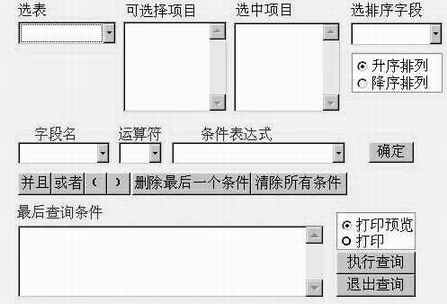
在查询表单中,5个组合框分别为:数据表选择框combo4、字段选择框combo1、运算符选择框combo2、条件表达式选择框combo3、排序字段选择框combo5;2个列表框分别为:选中表上所有字段列表框list1,选中要显示的字段列表框list2;9个命令按钮分别为:条件确认按钮──command1、与──command2、或──command3、(──command8)──command9、删除最后一个条件──command4,清除所有条件──command5,执行查询按钮──command6,退出查询按钮──command7;1个选项按钮:屏幕显示、打印;1个编辑框:显示生成的组合查询条件edit1;1个文本框:录入查询条件中非菜单录入的字段的值text1。
以下列出在表单中加入的几个主要的事件驱动程序:
1. 表单的Init
public array m(30) &&记录查询条件
public array list2(30)
public I,zdlx,num
public kk
num=0
kk=0
zdlx=''
I=0
select 256
use
select 200
use
select distinct表名from 数据字典into table tmp1
thisform.combo4.rowsource='tmp1'
thisform.combo4.rowsourcetype=2
2. 数据表选择框combo4的Click
sele 256
use
sele 200
use
select 表名 from 数据字典 dist into table tmp1
thisform.combo4.rowsource='tmp1'
thisform.combo4.rowsourcetype=2
3.数据表选择框combo4的Interactivechange
public fzzd
fzzd=''
sele 200
use
thisform.list2.rowsourcetype=0
thisform.list2.clear
select 字段名 from 数据字典 where 数据字典.表名= thisform.combo4.value into table tmp2
select 字段名 from 数据字典 where 数据字典.表名= thisform.combo4.value into table tmp3
select 字段名 from 数据字典 where 数据字典.表名= thisform.combo4.value into table tmp4
&&TMP2条件录入时的‘字段名’列表。TMP3供选择显示字段的列表框使用,TMP4供排序字段用。
select tmp3
copy stru to tmp
select 200
use tmp &&临时表,保存选择的要显示的字段
thisform.combo1.rowsource='tmp2'
thisform.combo1.rowsourcetype=2
thisform.list1.rowsource='tmp3'
thisform.list1.rowsourcetype=2
thisform.combo5.rowsource='tmp4'
thisform.combo5.rowsourcetype=2
4. 选中表的所有字段列表框list1.GotFocus
sele 200
use tmp
5.选中表的所有字段列表框list1的Dblclick
select tmp3
thisform.list2.additem(thisform.list1.list(recno()))
zdm=字段名
delete record recno()
pack
select 200
append blank
replace 字段名 with zdm
thisform.list2.requery
thisform.list1.requery
6.选中的要显示的字段列表框list2的Dblclick
select tmp3
if len(alltrim(字段名))>0
append blank
replace 字段名 with thisform.list2.list(thisform.list2.listindex)
select 200
delete all for alltrim(字段名)=alltrim(thisform.list2.list(thisform.list2.listindex))
pack
thisform.list2.removeitem(thisform.list2.listindex)
thisform.list2.requery
thisform.list1.requery
else
thisform.list2.removeitem(thisform.list2.listindex)
thisform.list2.requery
endif
7.选择排序字段组合框combo5.Interactivechange
fzzd=thisform..combo5.displayvalue
8.“确定”命令按钮command1的Click
if len(alltrim(thisform.combo1.displayvalue))=0
=messagebox('请先选择条件!')
retu
endif
i=i+1
if thisform.combo3.visible=.t.
m(i)=allt(thisform.combo1.value)+thisform.combo2.value+"'"+thisform.combo3.value+"'"
else
do case
case upper(zdlx)='C'
m(i)=allt(thisform.combo1.value)+thisform.combo2.value+"'"+allt(thisform.text1.value)+"'"
case upper(zdlx)='D'
m(i)=allt(thisform.combo1.value)+thisform.combo2.value+'{'+thisform.text1.value+'}'
case upper(zdlx)='N'
m(i)=allt(thisform.combo1.value)+thisform.combo2.value+thisform.text1.value
case upper(zdlx)='L'
m(i)=allt(thisform.combo1.value)+thisform.combo2.value+'.'+thisform.text1.value+'.'
other
m(i)=allt(thisform.combo1.value)+thisform.combo2.value+"'"+allt(thisform.text1.value)+"'"
endcase
endif
thisform.edit1.value=''
for j=1 to i
thisform.edit1.value=thisform.edit1.value+m(j)
endfor
thisform.combo1.value=''
thisform.combo2.value=''
thisform.text1.value=''
thisform.combo3.value=''
9.查询字段选择框combo1的Interactivechange
select 数据字典
loca all for 表名=thisform.combo4.displayvalue.and.字段名=thisform.combo1.displayvalue
ku=下拉菜单表
zdlx=字段类型
if 下拉菜单
thisform.combo3.visible=.T.
thisform.text1.visible=.F.
use
use 数据字典
select 字段名 from &ku into table tmp5
thisform.combo3.rowsource='tmp5'
thisform.combo3.rowsourcetype=2
else
thisform.text1.visible=.T.
thisform.combo3.visible=.F.
endif
10. “并且”命令按钮command1.click
i=i+1
m(i)='.and.'
thisform.edit1.value=thisform.edit1.value+m(i) * “或者”、“(”、“)”、 “删除最后条件”、 “删除所有条件”的click程序类似
11.“执行查询”命令按钮command6.click
public f_list
f_list=''
sjk='c:\所在目录\'+allt(thisform.combo4.displayvalue)
sele 200
use tmp
go bott
x=recno()
for y=1 to x-1
go y
f_list=f_list+alltrim(字段名)+','
endfor
go bott
f_list=f_list+alltrim(字段名)
sele 256
use &sjk
tj=thisform.edit1.value
set filter to &tj
if thisform.optiongroup1.option2.value=1
if len(alltrim(f_list))=0
creat report tmp_repo from &sjk alias
report form tmp_repo to prin noco
else
creat report tmp_repo from &sjk fields &f_list alias
report form tmp_repo to prin
endif
thisform.refresh
else
if thisform.optiongroup2.option1.value=1
if len(alltrim(fzzd))>0
index on &fzzd tag &fzzd
endif
else
if len(alltrim(fzzd))>0
index on &fzzd tag &fzzd descending
endif
endif
if len(alltrim(f_list))=0
brow
else
brow fields &f_list
endif
endif
thisform.refresh
12.“退出查询”命令按扭command7.click
thisform.release
在设计过程中的要点是:表单的数据环境中仅有数据字典表,其他有关表单的加入是在进行选择时随时加入的。该程序在Win95、中文VFP3.0环境下运行通过。