用VB实现图形文件的批量转换
由于工作的原因,这段时间我在处理多媒体、创建网站的时候,经常会遇到要转换大量图片的大小这种情况。而我们经常用到的图形处理工具,如PHOTOSHOP、FIREWORKS等软件,它们虽然能够改变图形的大小,但一般只能进行单个文件的转换,在需要转换大量文件的时候效率十分低。为了提高工作效率,我用VB编写了一个批量转换图形文件大小的程序,虽然界面比较粗糙,但比较实用。
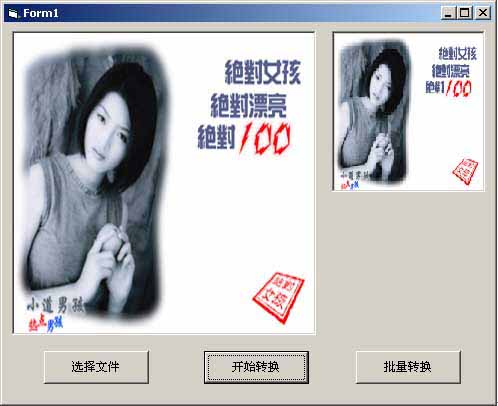
#1 程序界面如(图1)
#1 设计思路:
如上图所示,左边的图形框为Picture1,里面显示的就是要转换的图形文件,右边的图形框为Picture2,里面显示的就是转换后的图形文件。
首选通过CommonDialog控件选择图形文件,然后显示在Picture1上(注意:Picture1的AutoRedraw属性要设为True,AutoSize属性要设为True):Picture1.Picture = LoadPicture(CommonDialog1.FileName),然后设置分辨率(res=200),再设置坐标,把两个Picturebox的绘图区都设成长宽均为分辨率大小的坐标:Picture1.Scale(0,0)-(res,res),Picture2.Scale(0,0)-(res,res),当点击“开始转换”按钮时,将左图坐标(I,J)的点画到右图上:
For I=1 to res
For j=1 to res
Picture2.Pset(I,j),Picture1.point(I,j)
next j
next I
最后存储Picture2上的图形。
#1 程序代码:
以下是批量转换Pic1至Pic10这十个文件的程序代码:
Dim res As Integer '定义分辨率为全局变量
Private Sub Command2_Click() '点击“选择文件”按钮
CommonDialog1.filename = “”
Picture1.Picture = LoadPicture(CommonDialog1.filename)
CommonDialog1.Filter = “(*.jpg)|*.jpg|(*.bmp)|*.bmp”
CommonDialog1.DialogTitle = “打开图形文件”
CommonDialog1.Action = 1
Picture1.Picture = LoadPicture(CommonDialog1.filename)
End Sub
Private Sub command3_Click() '点击“批量转换”按钮
On Error GoTo errorhandler
CommonDialog1.filename = “”
Picture1.Picture = LoadPicture(CommonDialog1.filename)
CommonDialog1.Filter = “(*.jpg)|*.jpg|(*.bmp)|*.bmp”
CommonDialog1.DialogTitle = “打开图形文件”
CommonDialog1.Action = 1
Dim i,j,w,h,pd As Integer
Dim filelen, k As Integer
Dim filename As String
filelen = Len(CommonDialog1.filename)
pd = MsgBox(“是否按默认设置?”,vbYesNo,“选择框”)
If pd = 7 Then
w = InputBox(“请输入转换后的图形宽:”,“输入框:”,,0,0)
If w < 50 And w > 200 Then
GoTo handler
End If
h = InputBox(“请输入转换后的图形高:”,“输入框:”,,0,0)
If h < 50 And h > 200 Then
GoTo handler
End If
Picture2.Width = w * 15.3
Picture2.Height = h * 15.3
End If
For k = 1 To 10
filename = Left(CommonDialog1.filename, filelen - 5) & Trim(Str(k)) &- Right(CommonDialog1.filename,4) '批量载入pic1,pic2,……pic10
Picture1.Picture = LoadPicture(filename)
Picture1.Scale (0,0)-(res,res)
Picture2.Scale (0,0)-(res,res)
For i = 1 To res
For j = 1 To res
Picture2.PSet (i,j),Picture1.Point(i,j)
Next j
Next i
SavePicture Picture2.Image,Left(CommonDialog1.filename,filelen - 5) & Trim(Str(k)) &- “.bmp” '批量保存文件
Command4.Caption = filename
'Picture1.Visible = True
'Picture1.Picture = Picture2.Picture
Next k
Command4.Caption = “转换完毕”
errorhandler:
MsgBox (“文件不存在或存在错误!”)
handler
If w < 50 And w > 200 Or h < 50 And h > 200 Then
MsgBox “你输入的数字不对!”
End If
End Sub
Private Sub Form_Load()
res = 200 '设置分辨率为200
End Sub
Private Sub Command1_Click() '点击“开始转换”按钮
Dim i,j,w,h,pd As Integer
pd = MsgBox(“是否按默认设置?”, vbYesNo,“选择框”)
If pd = 7 Then
w = InputBox(“请输入转换后的图形宽:”,“输入框:”,,0,0)
If w < 50 And w > 200 Then
GoTo handler
End If
h = InputBox(“请输入转换后的图形高:”,“输入框:”,,0,0)
If h < 50 And h > 200 Then
GoTo handler
End If
Picture2.Width = w * 15.3
Picture2.Height = h * 15.3
End If
Picture1.Scale (0,0)-(res,res)
Picture2.Scale (0,0)-(res,res)
For i = 1 To res
For j = 1 To res
Picture2.PSet (i,j),Picture1.Point(i,j)
Next j
Next i
SavePicture Picture2.Image,Left(CommonDialog1.filename,filelen - 5) & Trim(Str(k)) &- “.bmp”
handler:
If w < 50 And w > 200 Or h < 50 And h > 200 Then
MsgBox “你输入的数字不对!”
End If
End Sub